TL;DR
- Production pipeline patterns for open-source AI generators in 2026: sync, queue worker, DAG, event-driven.
- Worked example with Redis plus Python RQ plus Ollama, retry logic, output validation, and Langfuse observability.
- When to pick cron, when to pick Temporal, when to pick LangGraph, when to pick Prefect, and why.
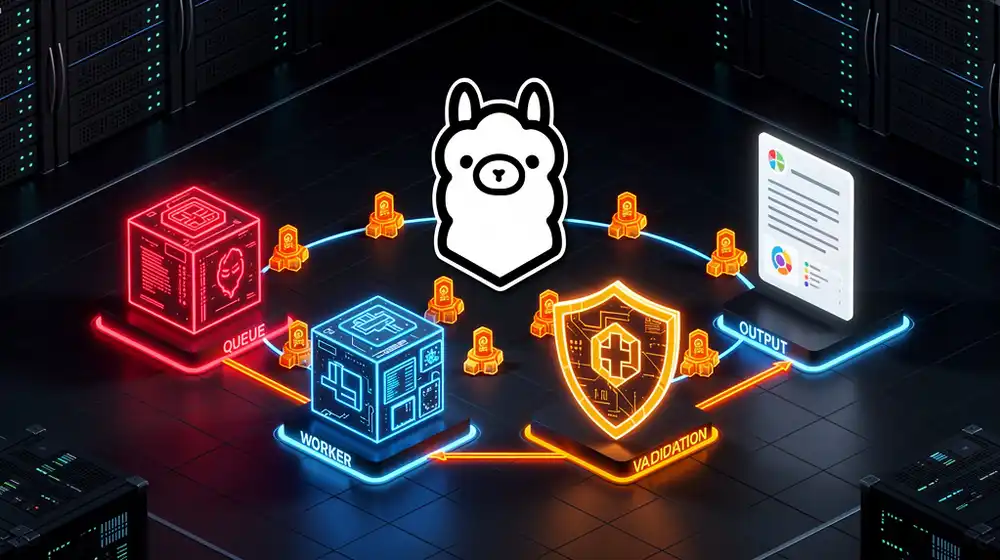
A production AI generator is not a single API call. It is a pipeline: a request queue, a worker that runs the LLM, a validator that checks the output, an output sink, and traces you can actually debug when something goes sideways at 3 AM. This guide walks through the patterns that show up over and over in real open-source AI generator pipelines, then ships a full Redis plus Python plus Ollama worked example you can copy today.
Everything here is open-weights first. The focus keyword throughout is AI generator, and the angle is unapologetically practical: we build the same kind of pipeline we run in production, in code you can actually read, with the trade-offs spelled out.
What an AI Generator Pipeline Actually Is
There are three distinct shapes of AI generation, and picking the wrong one is the most common mistake new builders make:
- Synchronous call. The user hits an endpoint, you call the model, you return the output in the same HTTP response. Fine for short completions under 5 seconds. Dies the moment you start generating 2,000-word articles or videos.
- Async job. The user submits a request, you return a job ID, and a worker processes it in the background. The user polls or receives a webhook when the job is done. This is 90% of real-world AI generator pipelines.
- Streaming. You stream tokens back as they are produced. Useful for chat UIs. Not a substitute for async when the total generation time exceeds the client timeout.
The rest of this guide is about the async job pattern, because that is where actual open source AI generator pipelines live.
The Four-Stage Pattern That Works Every Time
Every production pipeline we have ever shipped ends up with the same four stages:
- Request queue. Somewhere to park jobs: Redis, RabbitMQ, SQS, or Postgres with a
FOR UPDATE SKIP LOCKED query.
- LLM worker. A process that pops a job, calls the model, catches errors, and retries.
- Validator. A function that checks the output (schema, length, banned words, JSON-parseable, etc.) before it touches the sink.
- Output sink. Where finished artifacts go: a file, a database, a webhook POST to a CMS, object storage, or a chat channel.
Any tool you pick for orchestration (cron, RQ, Celery, Temporal, LangGraph, Prefect, Dagster) is just a different way of wiring those four stages together. The stages themselves do not change.
Pattern Catalog: Pick the Right Orchestrator
Here is our opinionated mapping of tool to use case. The point is to match complexity to need, not to grab the fanciest option.
| Pattern | Tool | Use when | Skip when |
|---|
| Simple cron | systemd timer, crontab, n8n Schedule | Fewer than 100 jobs/day, no retries needed, you want zero moving parts | You need retries, fan-out, or job status |
| Queue worker | Redis + RQ or Celery | Hundreds to thousands of jobs/day, retry logic, visible queue | You need long-running, stateful multi-step agents |
| Durable workflow | Temporal | Multi-hour agent runs, strict exactly-once guarantees, long retries | You are a single developer shipping a side project |
| Agent DAG | LangGraph | Branching agent logic, tool calls, stateful graphs | Your flow is linear |
| Data pipeline | Prefect or Dagster | Mixed AI and ETL, scheduling, data lineage matters | You are not already touching a warehouse |
For 80% of real open source AI generator pipelines, Redis plus RQ plus Python is the right answer. It is boring, fast, and you can run the whole thing in 60 MB of RAM. That is what we build next.
Worked Example: A Redis Plus RQ Plus Ollama AI Generator
This example takes a topic off a Redis queue, asks Ollama for a draft, validates the output, and writes the finished piece to disk. It handles retries, rate limiting, and basic observability hooks. Copy the files into a folder and you are five minutes from running.
1. Dependencies and Services
Spin up Redis and Ollama in one compose file:
services:
  redis:
    image: redis:7-alpine
    restart: unless-stopped
    ports:
      - "6379:6379"
    volumes:
      - redis_data:/data

  ollama:
    image: ollama/ollama:latest
    restart: unless-stopped
    ports:
      - "11434:11434"
    volumes:
      - ollama_data:/root/.ollama

volumes:
  redis_data:
  ollama_data:
docker compose up -d
docker exec -it $(docker ps -qf name=ollama) ollama pull qwen2.5:7b
python3 -m venv .venv && source .venv/bin/activate
pip install rq redis requests tenacity
2. The Worker Function
Save this as tasks.py. It contains the draft step, the validator, and the sink. The @retry decorator from tenacity handles transient Ollama failures.
import json
import pathlib
import time
import requests
from tenacity import retry, stop_after_attempt, wait_exponential

OLLAMA_URL = "http://localhost:11434/api/generate"
OUT_DIR = pathlib.Path("./generated")
OUT_DIR.mkdir(exist_ok=True)

class ValidationError(Exception):
    pass

@retry(stop=stop_after_attempt(3),
       wait=wait_exponential(multiplier=2, min=2, max=30))
def call_ollama(prompt: str, model: str = "qwen2.5:7b") -> str:
    r = requests.post(
        OLLAMA_URL,
        json={"model": model, "prompt": prompt, "stream": False,
              "options": {"num_ctx": 8192, "temperature": 0.7}},
        timeout=180,
    )
    r.raise_for_status()
    return r.json()["response"]

def validate_draft(text: str) -> None:
    if len(text) < 400:
        raise ValidationError(f"too short: {len(text)} chars")
    banned = ["revolutionary", "game-changing", "cutting-edge"]
    hits = [b for b in banned if b.lower() in text.lower()]
    if hits:
        raise ValidationError(f"banned words: {hits}")

def generate_article(topic: str) -> dict:
    started = time.time()
    prompt = (
        f"Write a 600-word technical blog draft about: {topic}. "
        "Use short sentences, active voice, no hype words. "
        "Return plain text only."
    )
    draft = call_ollama(prompt)
    validate_draft(draft)

    slug = topic.lower().replace(" ", "-")[:60]
    out = OUT_DIR / f"{slug}.txt"
    out.write_text(draft, encoding="utf-8")
    return {
        "topic": topic,
        "path": str(out),
        "chars": len(draft),
        "duration_s": round(time.time() - started, 2),
    }
3. The Enqueue Script and Worker
Save as enqueue.py:
from redis import Redis
from rq import Queue
from tasks import generate_article

q = Queue("ai-generator", connection=Redis())

topics = [
    "Running Qwen 2.5 7B on an Intel N100 mini PC",
    "Why Redis plus RQ beats Celery for small AI pipelines",
    "Self-hosted Langfuse in 10 minutes",
]
for t in topics:
    job = q.enqueue(generate_article, t, job_timeout=300, retry=None)
    print(f"queued {job.id} -> {t}")
Run it and the jobs land on the queue instantly. Then start one or more workers in separate terminals:
rq worker ai-generator --with-scheduler
Each worker pulls a job, calls Ollama, validates, writes the file, and moves on. If the model fails, tenacity retries with exponential backoff up to three times. If the validator rejects the output (too short, banned word), RQ marks the job as failed and you can inspect it with rq info.
Rate Limiting Without Losing Jobs
A single local Ollama instance serializes requests anyway. Once you add a frontier API like Claude or Gemini to the pipeline you need real rate limiting, or the provider will throttle you and your retries will make it worse. Two patterns we like:
- Token bucket in Redis. Use redis-token-bucket or a tiny Lua script. Every worker calls
bucket.take(1) before hitting the API. Simple, accurate, survives restarts.
- Single-concurrency queue. Run one worker with
rq worker --burst and push all API-bound jobs to a dedicated queue. Crude but ruthlessly effective.
Do not sprinkle time.sleep() in your task function. It blocks the worker, hides the problem from your metrics, and melts under load.
Observability: Add Langfuse in 15 Lines
You cannot debug an AI generator pipeline without traces. Every prompt, every retry, every validation failure needs to land somewhere searchable. Langfuse is the open-source pick and it self-hosts with one command.
git clone https://github.com/langfuse/langfuse.git
cd langfuse
docker compose up -d
Open http://localhost:3000, create a project, grab your public and secret keys. Then patch tasks.py to trace every generation:
from langfuse import Langfuse
lf = Langfuse(
    public_key="pk-lf-...",
    secret_key="sk-lf-...",
    host="http://localhost:3000",
)

def generate_article(topic: str) -> dict:
    trace = lf.trace(name="ai-generator", input={"topic": topic})
    try:
        gen = trace.generation(
            name="ollama-draft",
            model="qwen2.5:7b",
            input=topic,
        )
        draft = call_ollama(f"Write a 600-word draft about {topic}.")
        gen.end(output=draft)
        validate_draft(draft)
        return {"topic": topic, "chars": len(draft)}
    except Exception as e:
        trace.update(level="ERROR", status_message=str(e))
        raise
    finally:
        lf.flush()
Now every pipeline run shows up in the Langfuse UI with input, output, latency, and failure reason. When a worker silently produces garbage at 3 AM, you will thank yourself for the 15 lines.
Validation Strategies That Catch Real Bugs
LLMs do not fail loudly. They fail by producing plausible-sounding garbage. Build your validator like you build input validation for a REST API:
- Structural checks. Does it parse as JSON? Does it have the required keys? Is the length in the expected range?
- Content checks. Does it contain banned words (hype terms, competitor names, PII patterns)? Does it match a regex for the format you need?
- Semantic checks with a second model. A small local model or a cheap Claude Haiku 4.5 call can score the draft on a 1 to 5 rubric. Reject anything under 3 and requeue.
- Fixed-point retries. If validation fails, feed the validator error back into the model with "Your previous output failed because X. Try again." This single pattern fixes most JSON output bugs.
Deployment Notes for Production AI Generator Pipelines
Once the pipeline works on your laptop, three things need to change before you put it on a server:
- Supervise the workers. Use supervisord, systemd, or a Kubernetes Deployment. Bare
rq worker processes die silently when the model errors.
- Persist Redis. Turn on RDB snapshots or AOF. Losing the queue is losing money.
- Separate IO-bound and CPU-bound queues. Your Ollama worker is CPU-heavy. Your Claude API worker is IO-bound. Give them different queues and worker pools so a slow Ollama run does not starve the API queue.
For single-host deployments, a tiny Docker Compose with Redis, Ollama, two worker services, and Langfuse is enough. For multi-host, swap Docker Compose for K3s or full Kubernetes and keep the same service topology. The open source AI generator pipeline does not care which runtime you pick.
When to Graduate to Temporal or LangGraph
You will know it is time when one of these happens:
- You add a third or fourth model call and the retry logic becomes unreadable.
- Any single pipeline run takes longer than 15 minutes and you cannot afford to lose it on a worker restart.
- You start branching: if model A refuses, try model B, else escalate to a human.
- You want to replay a failed run exactly, not just retry it.
Temporal handles the durability side: workflows resume exactly where they stopped after a crash. LangGraph handles the branching side: stateful agent graphs with typed state, memory, and human-in-the-loop. Neither is worth the operational cost before you actually need them. Boring beats clever until boring breaks.
Sources and Further Reading
Ready to ship a real pipeline? Clone the compose snippet, pip install rq redis requests tenacity, paste tasks.py and enqueue.py, and in under ten minutes you will have a live AI generator pipeline with retries, validation, and a dashboard you can actually debug.