TL;DR
- LTX-2.3 distilled, audio plus video, open weights from Lightricks
- Phosphene plus Pinokio gives one-click install on Apple Silicon Macs
- Generate at 640x480 in about 5 min on M1 Max 16GB, then upscale to HD
System Requirements
| RAM | 16GB |
| GPU | Apple M1 Max or newer |
| VRAM | Unified 16GB |
✓ Apple Silicon
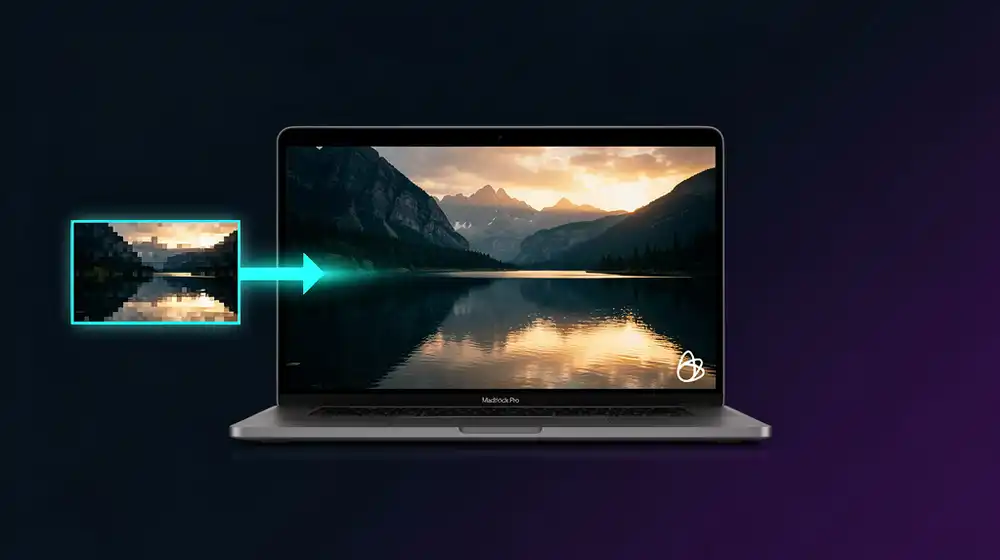
LTX-2 is the first open-weights audio-and-video diffusion model that runs in reasonable wall-clock time on a 16 GB Apple Silicon Mac. The default config wants 1280x704 and your laptop wants to throw the towel. Drop the resolution to 640x480, generate, then upscale the result with an AI upscaler in a second pass. That two-step recipe gets you a 5-second clip with synchronized audio in roughly 5 minutes on an M1 Max with 16 GB of unified memory. This guide walks the whole pipeline through Pinokio and the Phosphene LTX-2 launcher, then a one-call upscale to HD with fal.ai Topaz Video Upscale.
What LTX-2 Is (and Why Run It on a Mac)
LTX-2 is a DiT-based foundation model from Lightricks that generates synchronized video and audio in a single forward pass. Two checkpoints are public: a 22B development model and a 22B distilled-1.1 model that trades a small slice of fidelity for a far smaller compute bill. The distilled variant is the one you actually want on a laptop. Weights live on Hugging Face at Lightricks/LTX-2.3, the official inference repo at github.com/Lightricks/LTX-2.
The license is the LTX-2 Community License. Free commercial use is permitted up to 10 million dollars in annual revenue per organization. Above that threshold a paid commercial license is required. Personal projects, indie shops, agencies, and any company under the cap can ship work made with LTX-2 without paying anyone. There are also content restrictions you would expect: no deepfakes without consent, no medical or weapons applications, and no training a competing model on its outputs.
Running it locally matters for three reasons. Privacy is the obvious one: prompts and generated content stay on your machine. Cost is the second: cloud video models bill per second of output and the fee adds up quickly when you iterate on prompts. Speed is the third one nobody mentions. A local run starts immediately, no queue, no warmup, no waiting on someone else's GPU. On a Mac with the right config you click Generate and the bytes start landing.
The catch was always Apple Silicon. PyTorch on Metal had gaps, the model assumed CUDA, and unified memory pressure killed long runs. That picture changed in 2026 once MLX ports of LTX-2 (including Acelogic/LTX-2-MLX and dgrauet/ltx-2-mlx) landed and the Pinokio community wrapped a one-click installer around them. That installer is Phosphene.
The 640x480 Trick (Why Two Passes Beat One)
LTX-2 ships with 1280x704 as its default output. That looks reasonable on paper. In practice it asks the model to predict roughly 4.5x more tokens per frame than 640x480, which translates almost linearly into both wall-clock time and unified memory pressure. On 16 GB of unified memory the 1280x704 path either spills to disk or crashes outright. On 640x480 the same prompt finishes in about a fifth of the time and stays comfortably inside the memory budget.
The Pinokio creator summed it up cleanly on November 10, 2026: "8GB is All You Need." The trick is to stop asking the largest open video model in the world to do everything in one pass. Instead, generate at the resolution where the model is fast and stable, then hand the result to a dedicated upscaler that does one thing well.
| Resolution | Tokens per frame | 5-sec runtime on M1 Max 16GB | Memory pressure |
|---|
| 1280x704 (default) | ~3,600 | 20 to 40 min, often OOM | Heavy, swap risk |
| 640x480 (recommended) | ~800 | ~5 min | Light, stable |
| 512x320 (fastest) | ~480 | ~3 min | Very light |
An AI video upscaler closes the gap. Topaz Video AI, available on fal.ai as a single endpoint, takes a 640x480 clip and returns a clean 1920x1080 (or higher) version in less time than running LTX-2 at full res would take. The split also gives you something you do not get from the all-in-one path: the upscaler is temporally aware, fixes compression artifacts, and stabilizes shake. The output usually looks better than what the same hardware could produce in a single pass.
The two-pass workflow is also cheaper. You pay nothing for the local generation step and a small fal.ai fee per second of upscaled output. The fee is much smaller than what a full-res cloud video model would cost for the same final clip.
What You Will Need
This guide assumes a few things about your machine. Phosphene is Apple Silicon only. Intel Macs and Linux/Windows boxes are out of scope here.
- A Mac with Apple Silicon. M1 Pro, M1 Max, M2, M3, or M4. The 5-minute number assumes the M1 Max tier; an M2 Pro or M3 will be a touch faster, an M1 base will be slower.
- 16 GB of unified memory minimum. 24 GB is more comfortable, 32 GB or more lets you bump resolution. On 8 GB unified memory the model will load but the run becomes painful.
- About 30 GB of free disk space. The distilled LTX-2.3 weights and supporting files come to roughly 20 GB, plus working space for outputs.
- macOS 14 (Sonoma) or newer. MLX wants a recent Metal stack.
- Pinokio installed. Free, one-click installer for AI apps. Download from pinokio.co/download.html, pick the Apple Silicon build.
- A fal.ai account if you want the Topaz upscale step. Free signup, pay-per-use afterwards. Skip this if you plan to upscale locally instead.
Install Phosphene Through Pinokio
Pinokio handles the entire dependency stack. Python, git, the MLX toolchain, the LTX-2 weights, and the Phosphene web UI all install through one click. You never touch the terminal.
1. Install Pinokio
Download the Apple Silicon build from pinokio.co/download.html and drag the app into /Applications. On first launch macOS Gatekeeper will ask you to confirm. Open Pinokio, accept the brief tour, and you should land on the home screen with two main tabs: Discover and Apps.
2. Open Discover and Install Phosphene
Click Discover in the left sidebar. Type "Phosphene" into the search box. The matching script appears with an install button. Click Install. Pinokio creates a private project folder, clones the script, and starts pulling dependencies. The dependency install takes 3 to 5 minutes on a decent connection, mostly Python wheels and the MLX runtime.
If you cannot find Phosphene in Discover, the alternative is a community LTX-2 launcher that does the same thing with a slightly different UI. The Pinokio Discover tab is searchable by tag and the LTX-2 ecosystem on Pinokio has been growing fast through late 2026, so check there first before falling back to a manual install.
3. Let It Pull the LTX-2.3 Weights
Once dependencies are in, Pinokio will run the first-time setup that downloads the LTX-2.3 distilled checkpoint from Hugging Face. This is roughly 20 GB. Plan accordingly. You can leave the install window open and walk away. When the green "Open Web UI" button appears, the install is done and Phosphene is ready.
Click the button and Pinokio opens a local web interface in your default browser. The URL will be something like http://127.0.0.1:7860. Bookmark it. From now on you start Phosphene by clicking its tile in the Pinokio Apps tab.
Generate Your First 640x480 Clip
The Phosphene UI is a straight Gradio interface. There is a prompt field, a few generation knobs, and a Generate button. The defaults will not give you the 5-minute wall-clock target. Override them.
| Setting | Default | Use this | Why |
|---|
| Width | 1280 | 640 | Quarter the tokens per frame |
| Height | 704 | 480 | Standard 4:3 ratio that upscales cleanly |
| Duration | 5 seconds | 5 seconds | Keep it short for the first pass |
| FPS | 24 | 24 | Standard cinematic frame rate |
| Seed | random | random | Pin a seed once you find a prompt that works |
| Audio prompt | (empty) | (optional) | LTX-2 takes a separate audio prompt for synced audio |
For the prompt itself, LTX-2 responds best to specific scene descriptions with explicit camera language. A vague "a sunset" gets you a generic-looking clip. A specific "slow dolly forward over a misty Alpine lake at golden hour, mountains in background, soft volumetric light, 35mm film grain" gets you something usable.
Try this as your first prompt:
A slow dolly shot moving forward over a quiet alpine lake at sunrise.
Mist rising off the water. Snow-capped peaks in the background.
Warm golden light on the ridges. Subtle reflections on the lake surface.
Cinematic, 35mm, shallow depth of field.
If you want synchronized audio, fill the audio prompt field with a description of the soundscape: "soft ambient wind, distant bird calls, gentle water lapping at a shore". LTX-2 generates the audio in lock-step with the video, no separate render needed.
Click Generate. The status bar updates with progress per diffusion step. On an M1 Max 16 GB the run completes in roughly 5 minutes for a 5-second 640x480 clip with audio. The output lands in the Phosphene project folder under outputs/ as an MP4 with a numbered filename.
The very first generation after a fresh install takes longer because MLX has to compile and cache its Metal kernels. Expect 8 to 10 minutes on the first run, then 5 minutes on every subsequent run.
Upscale to HD With fal.ai Topaz
The 640x480 clip is functional but soft. The Topaz video model on fal.ai turns it into something you can ship. The endpoint accepts a URL or a base64 file, runs Topaz's temporally-aware upscaler, and returns a 1920x1080 (or higher) MP4. The whole call takes about as long as the LTX-2 run did, but the work is done on someone else's GPU.
Install the fal client first:
pip install fal-client
Set your fal.ai API key as an environment variable. Get the key from fal.ai/dashboard/keys and add it to your shell profile.
export FAL_KEY="your-fal-key-here"
Then this Python script uploads your 640x480 clip and runs the Topaz upscale:
import fal_client

video_path = "outputs/lake-sunrise.mp4"
video_url = fal_client.upload_file(video_path)

result = fal_client.subscribe(
    "fal-ai/topaz/upscale/video",
    arguments={
        "video_url": video_url,
        "upscale_factor": 3,
        "target_fps": 24,
    },
    with_logs=False,
)

print("Upscaled video:", result["video"]["url"])
An upscale_factor of 3 takes 640x480 to 1920x1440. If you would rather land on a clean 1920x1080, pre-crop the LTX-2 output to a 16:9 aspect ratio (640x360) before upscaling. Topaz also offers an explicit target resolution mode if you prefer to set 1920x1080 directly.
For a fully local pipeline that does not touch the cloud at all, install Real-ESRGAN through Pinokio's Discover tab and run a per-frame upscale plus a final reassemble. Real-ESRGAN is not temporally aware (it processes each frame independently), so you may see some flicker on motion-heavy clips, but the cost is zero and your prompt never leaves your machine.
The fal.ai Bytedance Upscaler is a cheaper middle ground. It is also temporally aware but lacks the depth of Topaz's artifact-removal stack. Pick Topaz for showcase work, Bytedance for batch processing where the per-clip cost matters.
Tips and Gotchas
Pin a seed once you have a prompt that works. LTX-2 is non-deterministic by default. When you find a generation you like, copy the seed from the Phosphene UI and reuse it. Small prompt edits with the same seed produce variations on the same scene rather than entirely new clips.
Watch the unified memory. Open Activity Monitor while the run is going. If memory pressure goes red, close other apps and try again. Browser tabs and Slack are the usual suspects. On 16 GB Macs, killing Slack alone often shaves 30 seconds off the run.
Audio prompts are powerful. Cocktailpeanut, the Pinokio creator, demonstrated this by feeding LTX-2 a static image plus a 120 BPM metronome and getting back 10 seconds of synchronized rhythmic motion. The audio input is not just a soundtrack, it is a second control signal.
The 22B-dev model is a trap on 16 GB. Phosphene defaults to the distilled checkpoint for a reason. The development model is higher fidelity but loads with no headroom on 16 GB unified memory and crashes on the first batch. If you want the dev model, plan for 24 GB or more.
First-run latency is not the steady-state. Benchmark only after the second or third run. MLX kernel caching, weight pre-loading, and Metal shader compilation all happen the first time. Real-world runtime stabilizes after warmup.
Quality scales with prompt specificity, not prompt length. A four-line prompt with a single clear scene beats a 30-line description with conflicting elements. Camera direction, lighting, and a named visual reference (35mm film, wide-angle lens, low-key lighting) move the result more than adjective stacking.
Skip the upscale on iteration runs. Iterate at 640x480 until you are happy with the prompt and the seed. Only then upscale the keeper. Each upscale call costs money (or local compute) and you will throw most iterations away.
What You Can Build With This
A 5-minute local generation cycle plus a one-call upscale changes what is feasible solo. Here are four projects that fit inside a weekend now:
B-roll for explainer videos. Generate scene transitions, location plates, and abstract motion backgrounds for YouTube essays without licensing stock footage. Each shot is 5 minutes plus a Topaz pass. A typical 10-minute video might need 8 to 12 of these.
Pre-vis for indie game cinematics. Block out cinematics for a short or a game trailer in LTX-2 first, refine the prompts that work, then take those references to a paid pipeline once the creative direction is locked. The cost of bad ideas drops to near zero.
Looping social-media motion posts. Generate a 5-second loop, upscale it, drop it on Instagram or TikTok. The combination of LTX-2's audio support and Phosphene's dead-simple UI lets you post one of these per day with no editing pipeline.
Style references for client pitches. Generate two or three motion mockups for a client deck before any real work happens. The clips are not finals, but they communicate motion and tone in a way storyboards never can.
Sources and Further Reading
You now have a complete local AI video pipeline running on a Mac that you can demo to a client this afternoon. Open Phosphene, drop in a prompt, run it at 640x480, push the result through Topaz, and you have a 1080p clip that started life on your own laptop. Save your favorite seeds, build a prompt library, and the next clip is 5 minutes away.